
Synchronize your calendar with Outlook and Google Calendar
Step-by-Step: Sync to Outlook (Recommended)
Why add via the browser? This is the most reliable way to ensure your calendar updates automatically and appears on both your computer and phone.
1. Copy the calendar link: On the calendar page, click the Subscribe button, then choose Copy URL. Keep the link copied — you will not need to return to the calendar page.

2. Open Outlook: Go to outlook.office.com.
3. Add a new calendar: In the sidebar, click on Add calendar and then select Subscribe from web.
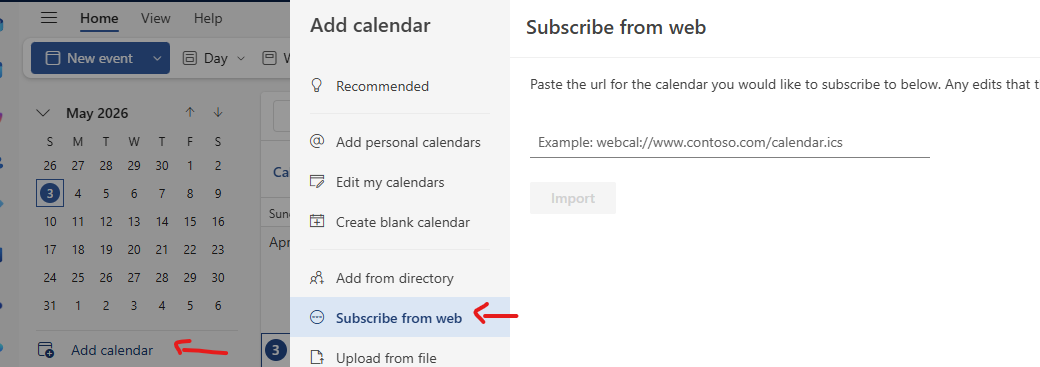
4. Paste the link: Paste the ICS URL you copied earlier, give the calendar a name (e.g., “Faculty Calendar”), and click Import.
Step-by-Step: Sync to Gmail (Google Calendar)
Why use this method? This is the simplest and most reliable way to keep your calendar updated across all your devices (Desktop & Mobile).
1. Copy the calendar link: On the calendar page, click Subscribe, then choose Copy URL. Keep the link copied — you will not need to return to the calendar page.
2. Open Google Calendar: Go to calendar.google.com.
3. Add a new calendar: On the left side, next to Other calendars, click the + sign and choose From URL.

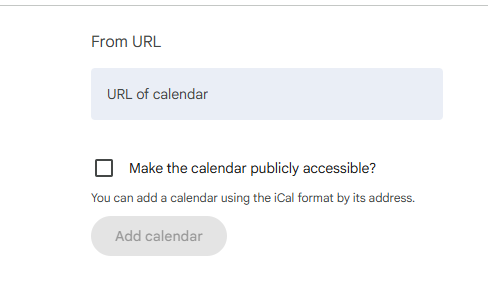
4. Paste the link: Paste the ICS URL you copied and click Add calendar.